
If you’re running an online coaching business, client check-ins are one of the most valuable things you do. They keep clients accountable, give you the data you need to adjust programming, and show clients that you’re paying attention. The problem is that doing them manually, creating forms, sending reminders, chasing responses and writing individual feedback, takes up a huge chunk of time that most coaches don’t have.
The good news is that most of this process can be automated. This guide walks you through how to automate client check-ins for online coaching, what to include in your check-in process, and how tools like My PT Hub can handle the heavy lifting for you.
Contents:
- 1. Why automating client check-ins matters for online coaches
- 2. Step 1: Decide on your check-in frequency and format
- 3. Step 2: Build a custom check-in form
- 4. Step 3: Automate recurring check-ins so you only set them up once
- 5. Step 4: Set up automated reminders and notifications
- 6. Step 5: Manage overdue check-ins without chasing clients manually
- 7. Step 6: Collect progress photos and measurements automatically
- 8. Step 7: Review and respond to check-ins efficiently
- 9. Step 8: Use AI to speed up personalized feedback
- 10. Step 9: Compare check-ins over time to track progress
- 11. Tips for getting clients to actually complete their check-ins
- 12. How to know your check-in system is working
Why automating client check-ins matters for online coaches

When you coach clients online, you don’t have the benefit of seeing them in person every week. Check-ins fill that gap. They give you a window into how clients are feeling, how their training is going, and what might need to change before small issues become bigger ones.
But when you’re managing 20, 30, or 50 clients, manually sending check-in forms, following up on missing responses, and writing individual replies becomes a second job. Automation solves this by doing the repetitive parts of the process for you, so you can focus on the coaching decisions that actually require your expertise.
A well-automated check-in system means:
- Clients receive their check-ins on a consistent schedule without you manually sending them
- Reminders go out automatically so you’re not chasing people
- Responses land in one place rather than scattered across your inbox
- You spend your time responding to check-ins, not managing the logistics of them
Decide on your check-in frequency and format

Before you set anything up, you need to know how often you want clients to check in and what kind of information you need from them. This will vary depending on your coaching style, the client’s goals, and the type of package they’re on.
Common check-in frequencies:
- Weekly is the most popular for online coaching. It gives you a regular pulse on how clients are doing without being overwhelming for either side.
- Bi-weekly works well for more experienced clients or lower-touch packages.
- Monthly suits clients who are largely self-sufficient and just need high-level accountability.
- Daily is less common but can work for habit-based coaching or short-term transformation programs.
As for format, most coaches use a combination of qualitative questions (how are you feeling, what went well, what was challenging) and quantitative data (current bodyweight, steps, sleep hours). Getting both gives you a fuller picture than numbers alone.
Build a custom check-in form
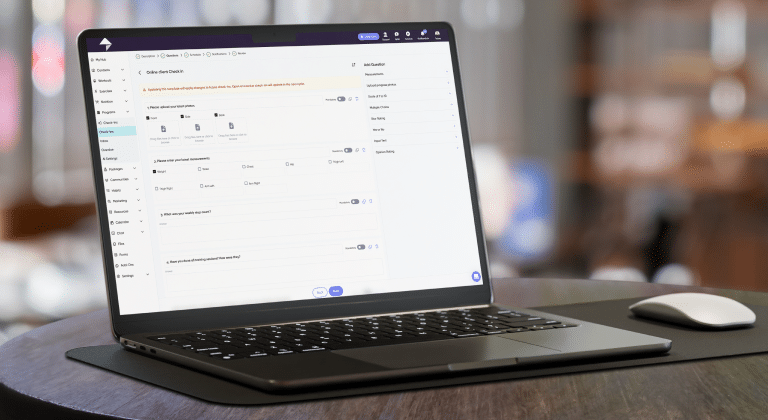
A generic check-in form that asks the same vague questions every week produces vague answers. The more specific and well-structured your form, the more useful the responses you’ll get back.
A solid weekly check-in form typically includes:
- A rating scale for energy levels and mood
- Training compliance (how many sessions did they complete?)
- Nutrition adherence (were they hitting their targets?)
- Sleep quality and average hours
- Current bodyweight (if relevant to their goals)
- An open-text field for anything else they want to flag
- An optional field for progress photos or measurements
Keep the form focused. A 20-question check-in will get abandoned. Aim for 6 to 10 well-chosen questions that give you what you actually need.
Using My PT Hub: My PT Hub’s Automated Check-Ins feature lets you create fully custom check-in questionnaires with multiple question types, including text inputs, sliding scales, multiple choice, and star ratings. You can include options for clients to log measurements and upload progress photos directly within the check-in form. Once built, the form is ready to be assigned and automated.
Automate recurring check-ins so you only set them up once

This is where automation really starts to pay off. Instead of manually assigning a check-in to every client every week, you set up a recurring check-in once and it sends automatically on your chosen schedule.
The practical benefit here is significant. Set it up correctly and you never have to think about sending check-ins again. They just go out, on time, every time, regardless of whether you’re busy coaching, on vacation, or asleep.
Using My PT Hub: Within the Automated Check-Ins feature, you can select a repeat setting of daily, weekly, bi-weekly, or monthly. Once set, My PT Hub automatically sends the check-in to the client on your chosen schedule from a specified start date. You only need to create the check-in once, and the platform does the rest.
Set up automated reminders and notifications
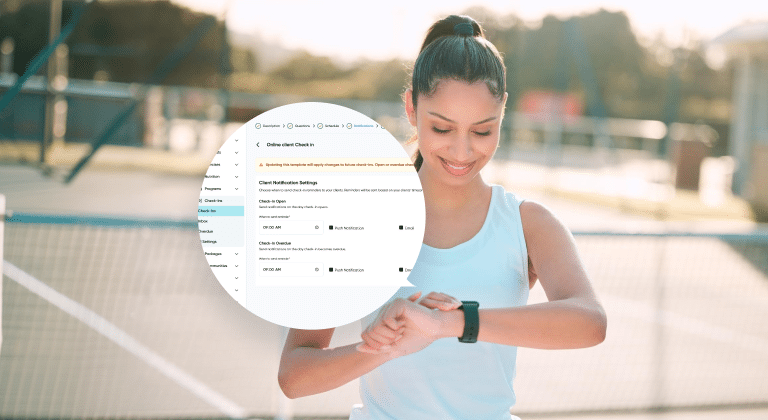
Getting the check-in to arrive in a client’s inbox is one thing. Getting them to actually complete it is another. Automated reminders significantly improve completion rates without requiring you to send a single manual follow-up.
Reminders work best when they’re timely and specific. A push notification that says “Your weekly check-in is ready” on the morning of check-in day is far more effective than a vague email reminder sent at a random time.
Using My PT Hub: You can configure automated push notifications and email reminders for clients when their check-in opens. These go out automatically based on the schedule you set, so clients are prompted to complete their check-in without you having to reach out manually. You can customize the timing of when the check-in opens, when it becomes overdue, and when it closes, giving you full control over the window clients have to respond.
Manage overdue check-ins without chasing clients manually
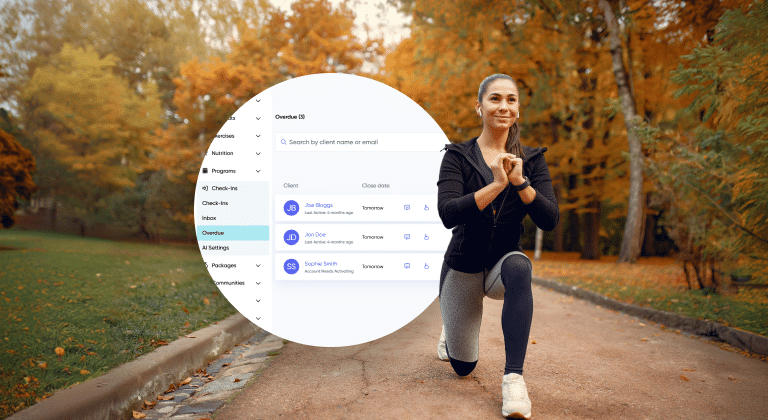
Even with reminders in place, some clients will still miss their check-in. Life happens. The key is having a system that flags this for you automatically, so you can follow up quickly rather than realizing three weeks later that someone hasn’t checked in at all.
Using My PT Hub: My PT Hub has a dedicated overdue check-ins area that shows you at a glance which clients haven’t submitted their check-in within the set timeframe. You can send a nudge notification directly from the platform to prompt them, without having to message each person individually. This keeps clients accountable without the awkward manual chase.
Collect progress photos and measurements automatically

Progress photos and body measurements are some of the most valuable data points in online coaching, but collecting them manually is a pain. Asking clients to email photos or send measurements via WhatsApp leads to inconsistent data stored in multiple places.
Integrating this into the check-in form solves the problem. When clients submit their check-in, they attach their photos and measurements at the same time, so everything is in one place.
Using My PT Hub: You can add measurement tracking and progress photo upload options directly to your check-in form. When clients submit these, the data is automatically synced to their client profile, updating their progress timeline without any manual input from you. This makes it straightforward to generate progress reports or pull up a transformation timeline whenever you need it.
Review and respond to check-ins efficiently

Once check-ins are coming in consistently, the next challenge is managing your responses without it eating up your entire morning. A dedicated inbox for check-ins makes this much faster than sorting through email threads or spreadsheet entries.
Tips for efficient check-in review:
- Set a specific time block each day or week for responding to check-ins
- Prioritize clients who have flagged issues or whose metrics are off track
- Keep responses focused and action-oriented rather than generic
- Use a mix of response formats to keep things engaging (text, voice notes, short videos)
Using My PT Hub:The dedicated Check-Ins Inbox works similarly to an email inbox and lets you view, respond to, and clear check-ins in one place. You can respond via text, voice note, or video directly from the platform. This keeps all check-in communication organized and searchable, rather than lost in a messaging thread.
Use AI to speed up personalized feedback

Responding to 30 check-ins with thoughtful, personalized feedback every week is one of the most time-consuming parts of online coaching. AI can dramatically reduce the time this takes (by up to 80%!) without sacrificing the quality or personal feel of your responses.
The goal isn’t to replace your coaching voice. It’s to give you a strong, personalized starting point that you can review, adjust, and send, rather than writing every response from scratch.
Using My PT Hub: My PT Hub’s Check-Ins AI feature allows coaches to generate personalized check-in feedback with a single click. The AI analyzes the client’s specific check-in responses alongside their workout data, nutrition logs, and personal bests to produce feedback that’s relevant to that individual client. It also reviews your last three check-ins with each client to replicate your communication style, so responses sound like you rather than a generic AI output. You can configure the tone, motivation style, emoji usage and response length through a dedicated ‘AI Settings’ tab within your account.
Compare check-ins over time to track progress
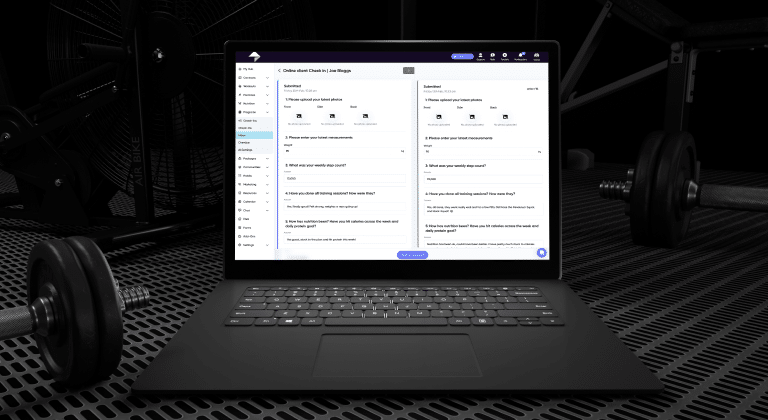
A single check-in tells you how a client is doing this week. A series of check-ins over months tells you whether your coaching is actually working. Building check-in comparison into your review process helps you spot trends, have better conversations with clients, and make more informed programming decisions.
This is also one of the most motivating things you can show a client. Seeing their own data improve over weeks and months is a powerful retention tool.
Using My PT Hub: My PT Hub includes a side-by-side check-in comparison tool that allows you to compare check-ins week-over-week, month-over-month, or across a custom date range. You can compare progress photos, metrics, and qualitative responses side by side, giving you a clear view of how a client has progressed since they started working with you.
Tips for getting clients to actually complete their check-ins
Automation handles the delivery and reminders, but check-in completion ultimately comes down to how you set expectations with clients from the start.
Set the expectation during onboarding.
Make it clear from day one that check-ins are a non-negotiable part of the coaching process. If clients understand why you need the information and how you use it, they’re more likely to take it seriously.
Keep the form reasonable.
A check-in that takes 30 minutes to complete will get skipped. One that takes 5-10 minutes will get done. Respect your clients’ time and they’ll respect the process.
Acknowledge responses every time.
Even a short reply shows clients that someone is reading what they’re submitting. If clients feel like their check-ins are going into a void, they’ll stop bothering.
Make the timing work for your clients.
A Monday morning check-in works well for many clients because it captures the previous week and sets intentions for the week ahead. Think about when your specific clients are most likely to complete it and schedule accordingly.
How to know your check-in system is actually working
A good automated check-in system should make your life easier and your coaching more effective. Here’s how to tell if it’s doing both:
- Are check-in completion rates above 80% across your client base?
- Are you spending less time on admin and more time on actual coaching decisions?
- Are clients responding more consistently than before you had automation in place?
- Are you catching issues, such as low energy, poor sleep, or adherence drops, early enough to address them?
- Are clients sticking around longer because they feel more supported?
If the answer to most of those is yes, your system is working. If completion rates are low or you’re still spending hours on check-in admin, it’s worth reviewing either the form itself, the notification setup, or the expectations you’ve set with clients.
In summary
Automating your client check-ins isn’t about doing less coaching. It’s about removing the parts of the process that don’t require your expertise, so you can spend more time on the parts that do. When check-ins go out automatically, reminders send themselves, responses land in a clean inbox, and AI helps you draft personalized feedback in seconds, you get to focus on the thing that actually matters: helping your clients make progress.
My PT Hub’s Automated Check-Ins feature, combined with Check-Ins AI, handles the full check-in workflow from form delivery to feedback generation within one platform. If your current check-in process involves manual reminders, scattered responses, and hours of writing feedback, it’s worth taking a look at what a more automated setup could do for your business.