
Online coaching removes a lot of barriers. Clients don’t need to commute to a gym, you don’t need a physical location, and you can work with people across different cities or time zones. But it also removes something that in-person coaching provides almost automatically: the natural accountability of showing up somewhere and having someone right there with you.
When clients are training on their own, at home or in a gym you’re not at, the gap between intention and action gets wider. Staying consistent is harder, and without the right systems in place, it’s easy for clients to drift. The good news is that accountability in remote coaching doesn’t have to be accidental. With the right structure, tools, and communication habits, you can build a level of accountability into your online coaching that rivals anything you’d get in person.
This guide breaks down exactly how to do that.
Contents:
- 1. Why accountability is the biggest challenge in online coaching
- 2. Step 1: Set clear expectations before coaching starts
- 3. Step 2: Build a structured check-in system
- 4. Step 3: Track workout compliance in real time
- 5. Step 4: Use habit tracking to fill the gaps between sessions
- 6. Step 5: Keep communication consistent without being reactive
- 7. Step 6: Monitor progress with data, not just feelings
- 8. Step 7: Use wearable integrations to get objective data
- 9. Step 8: Build community to create peer accountability
- 10. Step 9: Spot at-risk clients before they disappear
- 11. Tips for maintaining accountability at scale
- 12. How to know your remote accountability system is working
Why accountability is the biggest challenge in online coaching

In-person coaching has built-in accountability. A client books a session, shows up at a set time, and has a trainer standing next to them for an hour. The structure is baked in.
Remote coaching doesn’t work that way. Clients train when they decide to train. They log food if they feel like it. They report back when they remember to. Without intentional systems to replace the structure that in-person coaching provides naturally, accountability becomes entirely dependent on the client’s own motivation, which is rarely consistent.
This is why remote coaches who rely on a loose approach (a program emailed out monthly and a WhatsApp chat for check-ins) tend to see clients drop off after a few weeks. It’s not that the programming is bad. It’s that there’s no system holding anyone to it.
The solution is to build accountability into your remote coaching structure from the start, using clear expectations, regular touchpoints and tools that give you visibility into what clients are actually doing.
Set clear expectations before coaching starts
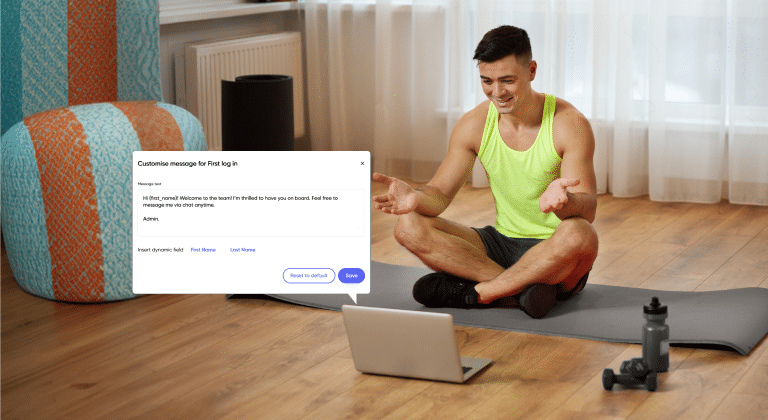
Accountability starts at onboarding. If clients don’t know what’s expected of them from day one, you’ll spend the rest of your time together chasing them rather than coaching them.
During onboarding, be explicit about:
- How often clients are expected to check in and by when
- How to log workouts and what information to include
- Whether nutrition tracking is required and how detailed it should be
- How quickly you respond to messages and when you’re available
- What happens if they miss a check-in or fall off track
Setting these expectations early does two things. It tells clients that you’re running a structured program, not just sending workouts and hoping for the best. And it gives you a clear baseline to refer back to if accountability starts to slip.
Using My PT Hub: You can set up automated onboarding workflows that assign goal-setting forms, waivers, and welcome materials to new clients as soon as they sign up. This means your expectations, processes, and instructions are delivered automatically before the first session, without you having to manually send them every time.
Build a structured check-in system
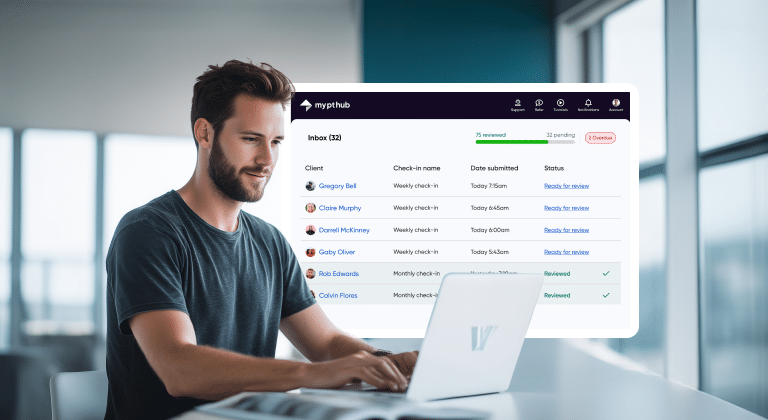
Regular check-ins are the backbone of remote accountability. They create a consistent rhythm between coach and client, give you the data you need to make informed programming decisions and signal to clients that someone is paying attention to how they’re doing.
The most effective check-in systems have a few things in common:
- They happen on a fixed schedule, so clients know exactly when to expect them
- They ask a consistent set of questions, covering both objective data and how clients are feeling
- They’re easy and quick for clients to complete
- They prompt a response from the coach, so clients don’t feel like they’re reporting into a void
Weekly check-ins work well for most remote coaching relationships. For newer clients or those in a more intensive phase of training, more frequent touchpoints (two to three times per week) can help bridge the gap while habits are being established.
Using My PT Hub: My PT Hub’s Automated Check-Ins feature lets you create custom check-in forms and set them to recur automatically on a daily, weekly, bi-weekly, or monthly basis. Once set up, check-ins go out to clients on schedule without you needing to send them manually. Automated push notifications and emails remind clients when their check-in is open, so you’re not spending time chasing responses. All submissions land in a dedicated Check-Ins Inbox where you can view and respond via text, voice note or video.
Track workout compliance in real time
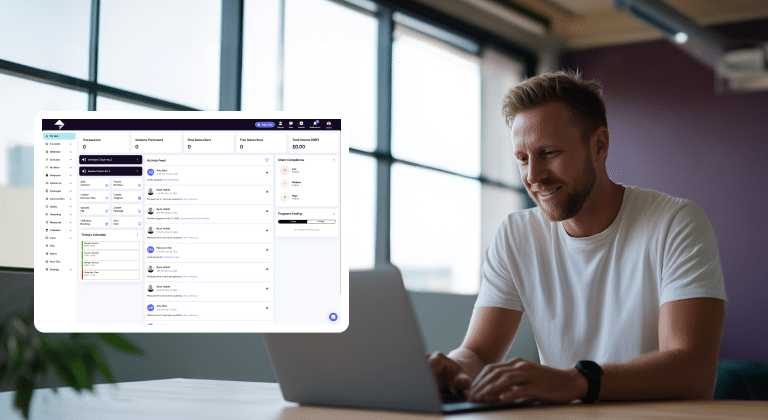
Knowing whether clients are completing their assigned workouts is fundamental to remote coaching. Without this visibility, you’re programming in the dark. You might spend time designing a progressive training plan while a client has been quietly skipping half their sessions for three weeks.
Real-time compliance tracking solves this by showing you, as soon as a workout is logged, what clients have and haven’t completed. You can see the full picture across your client base and respond quickly when someone falls behind.
Using My PT Hub: My PT Hub’s Activity Feed on the main dashboard gives you a real-time overview of client activity, including completed workouts, logged nutrition, and other assignments. For a more structured view, the Compliance feature (found under Programs) assigns a High, Medium, or Low compliance score to clients based on their program adherence. Both coaches and clients can see this score, which creates a layer of two-way accountability. You can also adjust the compliance scale in your settings to give clients more or less flexibility depending on how you run your programs.
Use habit tracking to fill the gaps between sessions
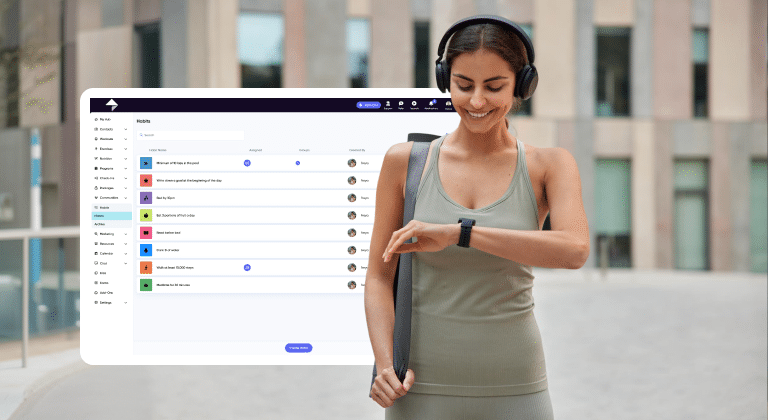
Training sessions are only a small fraction of a client’s week. What clients do in the hours and days between sessions, how they sleep, how much they move, whether they hit their protein targets, often has more impact on their results than the workouts themselves.
Habit tracking extends your coaching beyond the workout and into daily behaviors. It gives clients a simple, low-friction way to stay accountable to the small actions that compound over time, and gives you data on what’s actually happening in their day-to-day life.
Habits worth tracking for most clients include:
- Daily steps or general movemen
- Protein intake or a basic nutrition target
- Sleep duration
- Water intake
- A pre-workout preparation habit (meal timing, warm-up, etc.)
The key is to keep it manageable. Tracking three to five habits is realistic. Tracking twenty is not, and most clients will quietly stop using a system that feels overwhelming.
Using My PT Hub: My PT Hub’s Habit Tracker feature lets you create custom habits and assign them to individual clients or groups. Clients log their habits daily through the app, and you can view compliance data in real time. This gives you a more complete picture of how a client is living, not just how they’re training, which makes your coaching conversations far more informed and targeted.
Keep communication consistent without being reactive
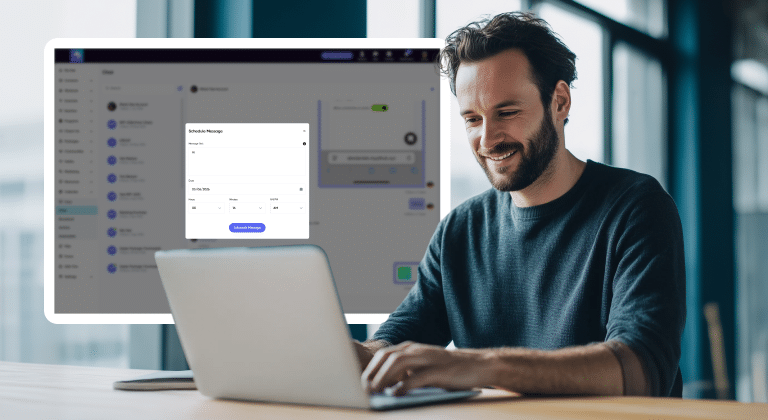
One of the most common mistakes remote coaches make is letting communication become entirely reactive. A client messages when something goes wrong, the coach replies. Otherwise, weeks can pass without any meaningful contact.
Consistent, proactive communication is one of the most effective accountability tools available, and it doesn’t require you to be available around the clock. Scheduled touchpoints and planned messages let you stay present in a client’s week without disrupting yours.
A simple communication rhythm for remote coaching might look like:
- A check-in response at the start of the week covering the previous week’s data
- A mid-week message acknowledging progress or flagging anything that needs adjusting
- A brief end-of-week note ahead of any weekend challenges
These don’t need to be long. A two-sentence voice note or a short message is often enough to keep a client engaged and feeling supported.
Using My PT Hub: My PT Hub supports individual, group, and broadcast messaging, with the option to schedule messages in advance. Scheduled messaging is particularly useful for maintaining communication without it eating into your day. You can draft messages at a time that suits you and set them to go out at the most relevant moment, such as the morning before a hard training day or the start of a new program week.
Monitor progress with data, not just feelings
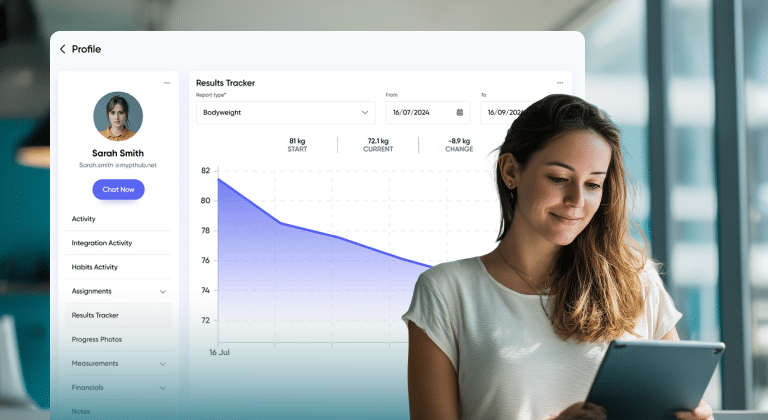
Remote clients can’t always tell how far they’ve come. Without the context of a coach watching them lift heavier weights or notice visible changes in their physique, progress can feel abstract. Clients who don’t feel like they’re making progress are clients who are at risk of disengaging.
Showing clients objective data changes this. When they can see that their squat weight has gone up by 20 pounds over three months, or that their body weight has trended consistently in the right direction, it reinforces the value of the work they’re doing and your coaching.
Using My PT Hub: My PT Hub’s Results Tracker lets you generate custom progress reports for individual clients, tracking metrics like body weight, strength performance, and personal bests over a chosen time period. Clients can also view their own results through their account. Regularly sharing progress reports during check-in reviews is a straightforward way to show clients the data behind their progress and keep them motivated through periods where visible change is slower.
Use wearable integrations to get objective data
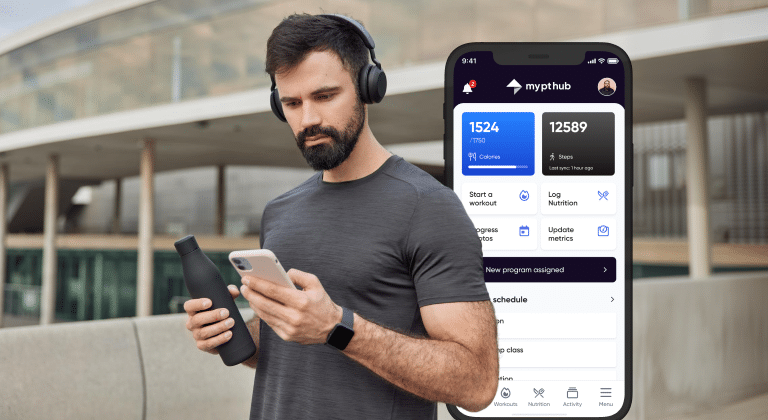
Self-reported data has its limits. Clients don’t always accurately estimate how much they’ve moved, how well they slept, or how hard they trained. Wearable devices remove the guesswork by capturing activity data automatically, giving you a more honest picture of what’s happening between sessions.
This is especially useful for:
- Tracking daily movement and step counts, which matter as much as formal workouts for most clients
- Monitoring sleep quality and identifying patterns that might explain low energy or poor recovery
- Checking resting heart rate trends as an indicator of fatigue or overtraining
- Verifying that calorie burn estimates are aligned with nutrition targets
The point isn’t to surveil clients. It’s to have better data so you can make better coaching decisions. When clients understand this framing, wearable tracking typically increases their engagement rather than making them feel watched.
Using My PT Hub: My PT Hub offers integrations with Apple Watch, Apple Health, Fitbit, Google Fit, and other wearable devices. Client health data from these integrations flows into their profile, giving you real-time insights from a single dashboard without needing to switch between apps. This allows you to view activity levels, sleep data, and other metrics alongside workout logs, check-in responses, and nutrition tracking, all in one place.
Build community to create peer accountability

Individual accountability between coach and client is important, but peer accountability, the feeling of being part of a group that’s working toward similar goals, is a powerful complement to it. Clients who feel connected to a community around their training are more likely to stay consistent and less likely to drop off quietly.
This doesn’t mean you need to run a large-scale group program. Even a small community of clients who share updates, celebrate wins, and support each other through difficult weeks can dramatically improve engagement and retention.
Using My PT Hub: My PT Hub includes a Communities feature that lets you create and manage a group space within the app. You can use this to share updates, post challenges, celebrate client milestones, and encourage clients to engage with each other. Unlike generic social media groups, this keeps the community within your coaching environment, which is fully branded, more professional and easier to manage.
Spot at-risk clients before they disappear
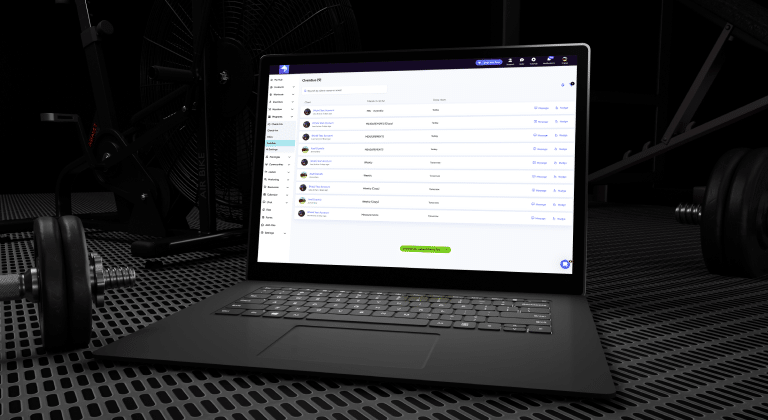
In remote coaching, clients who are disengaging don’t always tell you. They gradually stop logging workouts, miss a check-in or two, go quiet on messages, and then cancel. By the time it’s obvious something is wrong, it may be too late to turn it around.
The key is to catch the warning signs early. A drop in workout compliance, a missed check-in, reduced responsiveness to messages; these are all early indicators that a client is losing momentum. Acting on them quickly, with a personalized message or an adjusted program, is almost always more effective than waiting until a client is fully disengaged.
Using My PT Hub: My PT Hub’s compliance scoring and Activity Feed make it straightforward to monitor engagement across your entire client base at a glance. Clients with dropping compliance scores or no recent logged activity stand out quickly, allowing you to reach out before the situation becomes harder to recover. The overdue check-ins area within the Automated Check-Ins feature also flags clients who haven’t submitted their check-in within the set timeframe, so you can send a nudge notification directly from the platform.
Tips for maintaining accountability at scale
As your client base grows, the systems that worked for five clients won’t necessarily work for fifty. Here’s how to maintain accountability without burning out.
Use templates and bulk assignment.
Don’t build every program from scratch or send every message individually. Templates and multi-assign shortcuts let you deliver personalized-feeling content to many clients at once.
Tier your check-in frequency by client need.
New clients need more touchpoints. Established clients with strong compliance might only need a weekly check-in and a light mid-week message. Match the level of contact to where each client is in their journey.
Automate the routine, personalize the important.
Let automation handle reminders, recurring check-ins, and scheduled messages. Save your personal attention for responding to check-ins thoughtfully, adjusting programs and reaching out to clients who are struggling.
Review compliance data weekly.
Set aside a short block of time each week to look at your compliance scores and activity feed. It’s much easier to deal with a small issue early than to rebuild momentum after a client has been off track for a month.
How to know your remote accountability system is working
A strong remote accountability system should produce measurable improvements in client engagement and retention. Some useful indicators:
- Are check-in completion rates consistently above 80% across your client base?
- Are clients logging their workouts regularly rather than doing it in one catch-up session?
- Are clients sticking with you past the first three months?
- Are you catching disengagement early and recovering clients who would previously have churned quietly?
- Are clients reporting that they feel supported and connected despite training remotely?
If most of these are tracking in the right direction, your system is working. If clients are still going quiet and dropping off, it’s worth looking at where the gaps are, whether in your check-in process, communication frequency, or how clearly expectations were set at the start.
In summary
Accountability in remote coaching isn’t something that happens by accident. It’s built deliberately through clear expectations, consistent communication, structured check-ins, real-time compliance tracking and the right tools to support all of it.
My PT Hub brings the core accountability tools covered in this guide, including automated check-ins, habit tracking, compliance scoring, real-time activity monitoring, wearable integrations, messaging, and community, into one platform built specifically for fitness coaches. If you’re piecing together your remote accountability system across multiple apps and manual processes, consolidating it into a single purpose-built tool is one of the most impactful changes you can make to your business.