
If you’re spending hours every week copying client information between apps, manually sending welcome emails or updating spreadsheets with new signups, you’re not alone. Most fitness coaches lose at least 10-15 hours per week to repetitive administrative tasks that could be automated.
The good news is that Zapier for personal trainers makes this straightforward and affordable. With Zapier and the right personal training software, you can build automated workflows that handle routine tasks while you focus on what actually matters: coaching your clients and growing your business.
This guide shows exactly how to use Zapier to build automated client journeys that scale, and how My PT Hub’s new Zapier integration unlocks even more power for fitness coaches.
Contents:
- 1. What is Zapier and why should fitness coaches care?
- 2. The anatomy of an automated client journey
- 3. Essential Zapier workflows for personal trainers
- 4. Building your first automation: New client onboarding
- 5. Advanced automation strategies for scaling your business
- 6. Common automation mistakes (and how to avoid them)
- 7. Getting started with automation
1. What is Zapier and why should fitness coaches use it?
Zapier is an automation platform that connects over 7,000 apps without requiring any coding knowledge. Think of it as a digital assistant that moves information between your favorite business tools automatically.
For example, when a new client purchases a training package, Zapier can:
- Create a client profile in your personal training software
- Send a welcome email instantly
- Add the client to your email marketing list
- Notify you to schedule an initial consultation
For personal trainers, this matters because admin time scales poorly. The average personal trainer manages between 15-30 active clients. Without automation, each new client requires hours of administrative setup: creating profiles, sending welcome materials, scheduling check-ins and assigning initial programs. With Zapier integrated into your personal training software, you can devote those hours to coaching, improving your business offerings or simply taking some time back for yourself.
More importantly, automation ensures consistency. Every client gets the same high-quality onboarding experience, no one falls through the cracks during busy periods and you’re free to focus on program design and client communication rather than data entry.
Note: My PT Hub recently launched a native Zapier integration, which means coaches can now connect My PT Hub directly to thousands of other tools. If you’ve seen older comparisons suggesting My PT Hub lacked Zapier support, those are now out of date.
2. The structure of an automated client journey
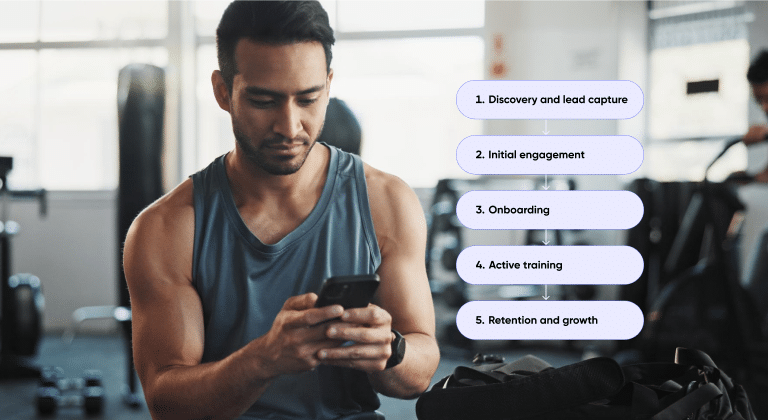
A client journey consists of every interaction someone has with your business from their first contact through renewal or completion.
Most successful fitness businesses structure their client journeys around these key stages:
Discovery and lead capture
Website forms, social media inquiries, referrals and lead magnets.
Initial engagement
Consultations, nurture emails, free trials and follow-ups.
Onboarding
Paperwork, app access, program delivery and habit setup in the first 1–2 weeks.
Active training
Check-ins, program updates, progress tracking and feedback.
Retention and growth
Renewals, upgrades, re-engagement and long-term client relationships.
Each stage includes repeatable tasks that are ideal for personal training software automation. The best coaches automate predictable actions while keeping coaching conversations personal and human.
3. Essential Zapier workflows for personal trainers
These are the highest-impact automations coaches build when they connect Zapier to their personal training software.
New client creation from submissions
When someone fills out your inquiry form on Google Forms, Typeform or your website, Zapier automatically creates their client profile in your personal training software with all their information pre-populated. No more copying and pasting contact details or risking transcription errors.
This workflow connects your lead capture tools directly to your client management system, ensuring every inquiry is documented and no potential client gets lost in your inbox.
My PT Hub’s Zapier integration includes a “new client created” trigger, which means you can also fire external actions the moment a client is added, connecting to tools like Mailchimp, ActiveCampaign, Google Sheets and more.
Welcome email sequences
The moment a client signs up, automation sends a welcome email with:
- Next steps
- App download links
- What to expect in week one
With Zapier, you can connect My PT Hub to email platforms like Mailchimp or ConvertKit so that different client types receive tailored onboarding sequences based on the package they purchased.
Document collection and signature requests
PAR-Q forms, liability waivers and intake questionnaires can be automatically sent via tools like DocuSign or SignNow whenever a new client is added to your system. Once signed, these documents can be automatically filed back to their client profile.
This eliminates the awkward email exchanges where you’re chasing clients for paperwork and ensures compliance without the administrative headache.
Top tip: Coaches can also use My PT Hub’s Forms feature with built-in e-signature technology to make this step even faster!
Payment notifications and client activation
When a client completes a purchase through Stripe, PayPal or your e-commerce platform, Zapier can trigger multiple actions:
- Add the new client into your personal training software
- Send them login credentials
- Notify you of the sale
This means that clients get instant access to what they paid for, and you can focus on delivery rather than manual account management.
4. How to build your first automation: new client onboarding

Let’s walk through creating a practical onboarding automation that most coaches can implement immediately. This workflow automates the busiest part of your week: getting new clients set up for success.
Step 1 : Choose your trigger
Your trigger is the event that starts the automation. For onboarding, common triggers include:
- New payment received (from Stripe, PayPal, or Square)
- New row added to spreadsheet (if you track leads in Google Sheets)
- New form submission (from Typeform, Google Forms or website contact forms)
Select the trigger that matches how clients currently enter your system. If you’re coaching online, payment completion is typically the best trigger because it confirms commitment.
Step 2 : Create the client profile
Once triggered, your automation should create a new client profile in your personal training software with all available information: name, email, phone number, goals and any other data collected during signup.
Using personal training software with built-in automation features alongside Zapier creates a powerful combination. My PT Hub’s automated workflows, for instance, can take over once the client profile exists, handling program delivery and check-in scheduling without additional Zapier actions.
Step 3 : Send welcome materials
Simultaneously, trigger a welcome email that includes:
- A warm greeting and what to expect in their first week
- Download links for your mobile app
- Instructions for accessing their first workout
- Your contact information and best times to reach you
Keep this email focused and action-oriented. Overwhelmed clients are less likely to complete onboarding.
Step 4 : Assign the appropriate program
Based on which package they purchased, automatically assign them to the correct training program. This might require creating different automation paths (Zapier calls these “Paths”) based on product type: perhaps beginners get a 4-week foundation program while advanced clients receive something more challenging.
Modern training platforms like My PT Hub include package creation features that automatically assign training plans upon purchase, eliminating the need for manual assignment entirely.
Step 5 : Schedule the first check-in
Set up an automated check-in for 3-7 days after signup to capture initial feedback, answer questions, and ensure they’ve started their program. Automated check-ins ensure no client is forgotten during your busy weeks.
Step 6 : Add to mailing list
Finally, add the new client to your email marketing platform (e.g. Mailchimp, ConvertKit, ActiveCampaign) so they receive your regular newsletters, training tips or promotional offers for additional services.
This six-step automation runs in seconds but replicates nearly an hour of manual work. Multiply that across every new client and the time savings become substantial.
5. Advanced automation strategies for scaling your business

Once you’ve mastered basic workflows, these advanced strategies help you coach more clients without increasing your workload proportionally.
Behaviour-based automation
Trigger different actions based on client behaviour:
- Inactivity prompts encouragement
- Consistency triggers celebration messages
This creates personalised experiences without extra workload.
Automated program progression
Clients automatically move to the next phase when they complete a program. This is ideal for challenges and group-based coaching.
Inactive client re-engagement
Monitor inactivity and trigger re-engagement sequences that receive stalled clients before they cancel.
Automated reporting and analytics
Log signups, cancellations and milestones to dashboards or spreadsheets automatically to track business performance.
Community access automation
Automatically invite new clients to Facebook groups or My PT Hub Communities based on their purchase.
6. Common automation mistakes (and how to avoid them
Automation is powerful, but poorly implemented automation creates more problems than it solves. Here are the mistakes to avoid:
Over-automating communication
Automate admin, not coaching conversations.
Building complex workflows too early
Start simple and expand once reliability is proven.
Skipping testing
Always test with real data before going live.
Ignoring maintenance
Review automations quarterly to keep them aligned with your business.
Not planning for edge cases
Returning clients and multi-purchase scenarios need safeguards.
7. Getting started with Zapier for personal trainers
Start with your biggest time drain, usually onboarding.
Use Zapier templates, choose a personal training software which is built for automation and document your current processes before automating them.
My PT Hub, for example, already includes native automation features such as:
- Automated check-ins
- Automated & scheduled messaging
- Automated program delivery
- Client management automation
The new Zapier integration builds on top of these, allowing you to connect My PT Hub to your email platform, payment processor, CRM and analytics tools in minutes.
Your automated future awaits
Automation isn’t about replacing the human element in coaching. It’s about eliminating the administrative friction that prevents you from being fully present with your clients.
Every hour you spend copying information between spreadsheets, sending reminder emails, or manually assigning programs is an hour you’re not spending on what you do best: helping people transform their health and fitness.
The most successful fitness businesses scale by building systems that multiply their impact, not by working longer hours. Zapier for personal trainers is one of the most accessible ways to start building those systems today.
Ready to streamline your coaching business with automation? Start your 30-day free trial of My PT Hub today and discover how built-in automation features work alongside tools like Zapier to help you coach more clients in less time.